HELP CENTER · INTEGRATIONS
Airbnb integration
Connecting Airbnb is the fastest way to a finished guidebook: your listings arrive with names, addresses, cover photos, WiFi, house manuals and rules attached, and one click turns each one into a complete guide. The connection runs through Hospitable Connect, an official Airbnb software partner. You approve it while signed in to Airbnb; you never type an Airbnb password here.
Steps to complete your integration
Step 1. Connect your Airbnb account
- In your dashboard open Integrations and click Connect on the Airbnb card.
- Hospitable Connect opens Airbnb's own authorization screen. Sign in to Airbnb if asked.
- Review the access it describes and click Connect my Airbnb account. You land back on Tabellara with the card showing Connected.
The authorization grants read access to your listings, their content and their photos. Tabellara cannot change your listing, calendar or pricing, and only ever messages a guest when you turn that on yourself.
Step 2. Your listings appear
Every listing on the connected account shows up as a card with its name, address and cover photo. The cover photo is copied into your Library automatically, in full resolution.
If a listing is missing, click Refresh listings.
Step 3. Build a guide with AI
- Click Create my guide on a listing.
- Pick the photos to import. They land in your Library with captions.
- Wait about a minute. The AI writes the entire guide: house manual, WiFi, check-in and checkout details, rules from your listing, your photos on the matching cards, and real local restaurants and attractions researched and mapped.
The AI places each photo on the card it best explains, so a photo of the coffee station lands on the coffee card. Swap the cover, theme, layout and fonts any time in the editor.
Step 4. Review and publish
- Read through each section in the editor beside the live phone.
- Fix anything the AI phrased differently than you would, and add the cards it could not know about (trash day, parking quirks, the sticky gate).
- Click Publish. Publishing uses one license; building and previewing are always free.
Step 5. Photos, rebuilds and more listings
- Import more listing photos any time from the Integrations page. Already-imported photos are marked so nothing is duplicated.
- Each listing can be rebuilt with AI once per day if you want a fresh draft.
Message every guest their guide link automatically
Once a property is connected on the Reservations page, Tabellara can send each guest their personal guide link for you, about five minutes after a booking is accepted, in the Airbnb message thread.
- Open Journey, pick the property, and find the Booking step.
- Turn the message on, edit the introduction, sign-off and name to taste, and click Save message.
Disconnecting
Click Disconnect on the Airbnb card. This releases your Airbnb account on Hospitable's side too. Everything already imported (guides, photos, properties) stays in your account and keeps working; only the live link to Airbnb goes away.
Common questions
Do I need a Hospitable subscription?
No. Hospitable Connect is the authorization bridge Airbnb uses for approved partners; there is nothing to sign up for or pay. You only need your Airbnb login.
Which Airbnb details come across?
Listing name and address, the cover photo and full photo set with captions, WiFi name and password, check-in and check-out times, the house manual, guest access notes, house rules, and the listing description and amenities.
Will the guide change if I edit my Airbnb listing later?
Not automatically; the guide is yours to edit once built. Rebuild with AI (once per day per listing) if you want a fresh draft, or edit the guide directly, which is usually faster.
Can I use Tabellara without connecting Airbnb?
Yes. Every guide can be built by hand from the starter template, with your own photos and text. Connecting Airbnb saves the typing and enables the AI build; it is not required to publish.
I have listings on Vrbo or another platform too.
The AI build currently reads Airbnb and OwnerRez listings. Build guides for other listings by hand, or connect the Airbnb version of a cross-listed property and use that guide everywhere; more channel managers are on the way.
Go further
A guidebook is the start of the stay. These run on it, at the same properties, from the same dashboard.
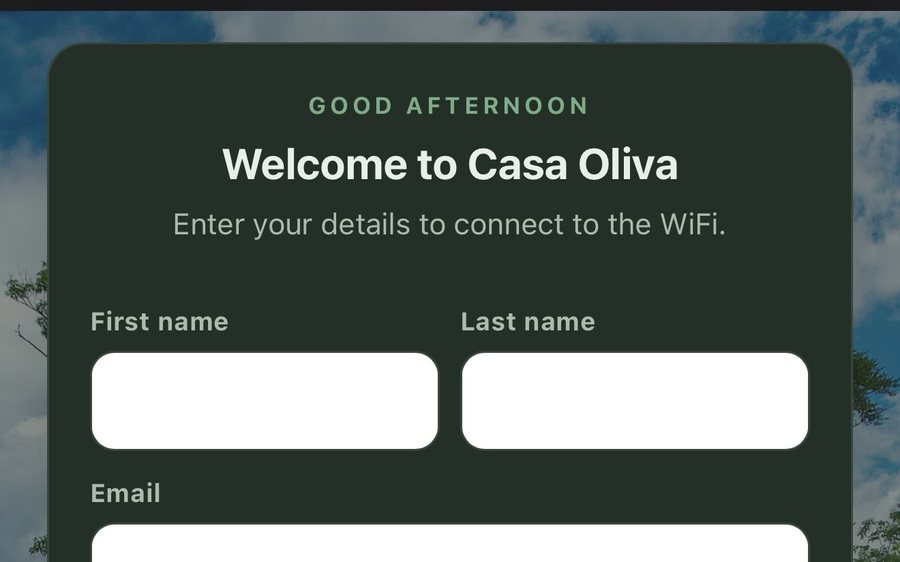
Guest WiFi
Guests join your network through a branded sign-in page and land in the guidebook. Every name and email is yours to keep. Runs on the UniFi gear you already own: $6 a network, the first free for 30 days.
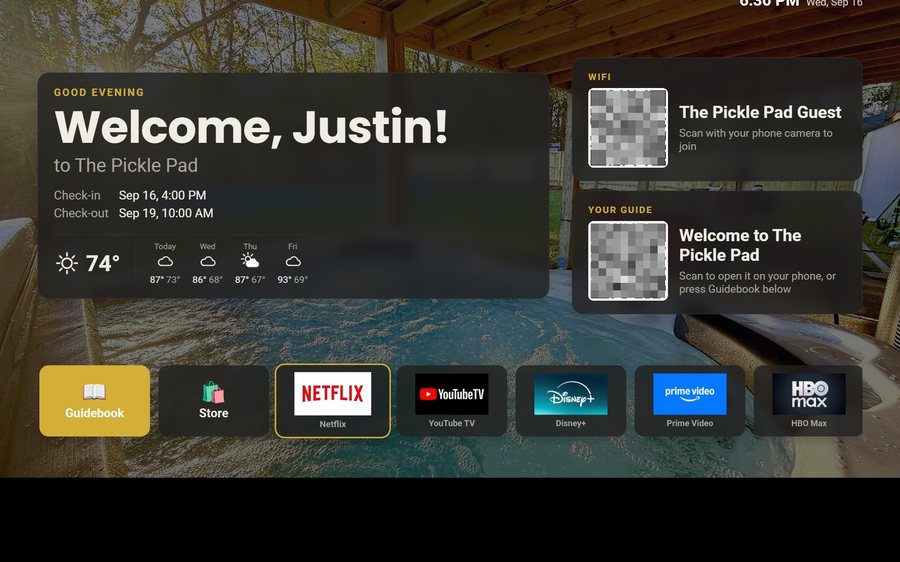
Guest TV
Your guidebook on the onn or Google TV in the living room: a welcome by name, the WiFi and guide codes on screen, and every app signed out at checkout. $6 a property for up to three TVs, the first free for 30 days.
Still stuck?
Email support@tabellara.com and a human will help; we usually reply the same day.
All help articles