The welcome screen on the TV
they already watch.
Your guidebook on the television: a welcome by name, the WiFi and guide codes, ratings that go to Google, a screensaver that sells, and a clean sign-out after every stay. On the onn streaming box or Google TV set you already own, or any TV that runs Google TV.
$6 per property per month, up to three TVs. First property free for 30 days, no card required.


The arrival
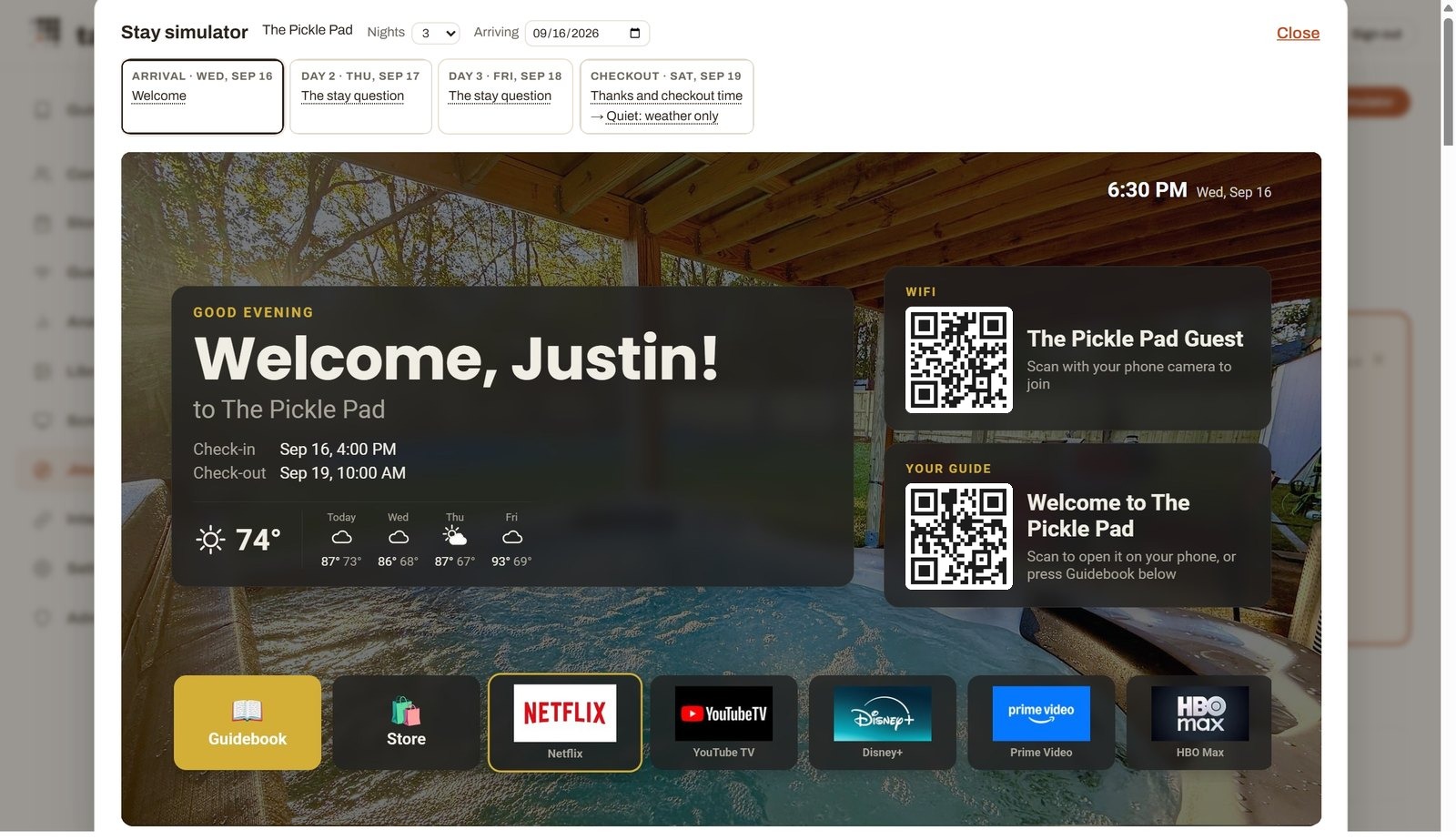
They walk in, the TV is on, and it knows who they are. Their first name, the dates of the stay, the weather for the week, a code to join the WiFi and a code that opens your guidebook on their phone, over a photo of the house. Below it, the streaming apps you allow. Nobody touched a remote to make that happen.
Nobody touches anything
Every stay runs the same loop, on its own, from the booking to the reset.
A booking arrives
Airbnb, OwnerRez or Hospitable syncs it. Nothing to enter.
The TV wakes before check-in
It turns itself on ahead of arrival, already showing the right name.
The guest is greeted
Welcome by name, dates, weather, the WiFi and guide codes, their apps.
The stay question
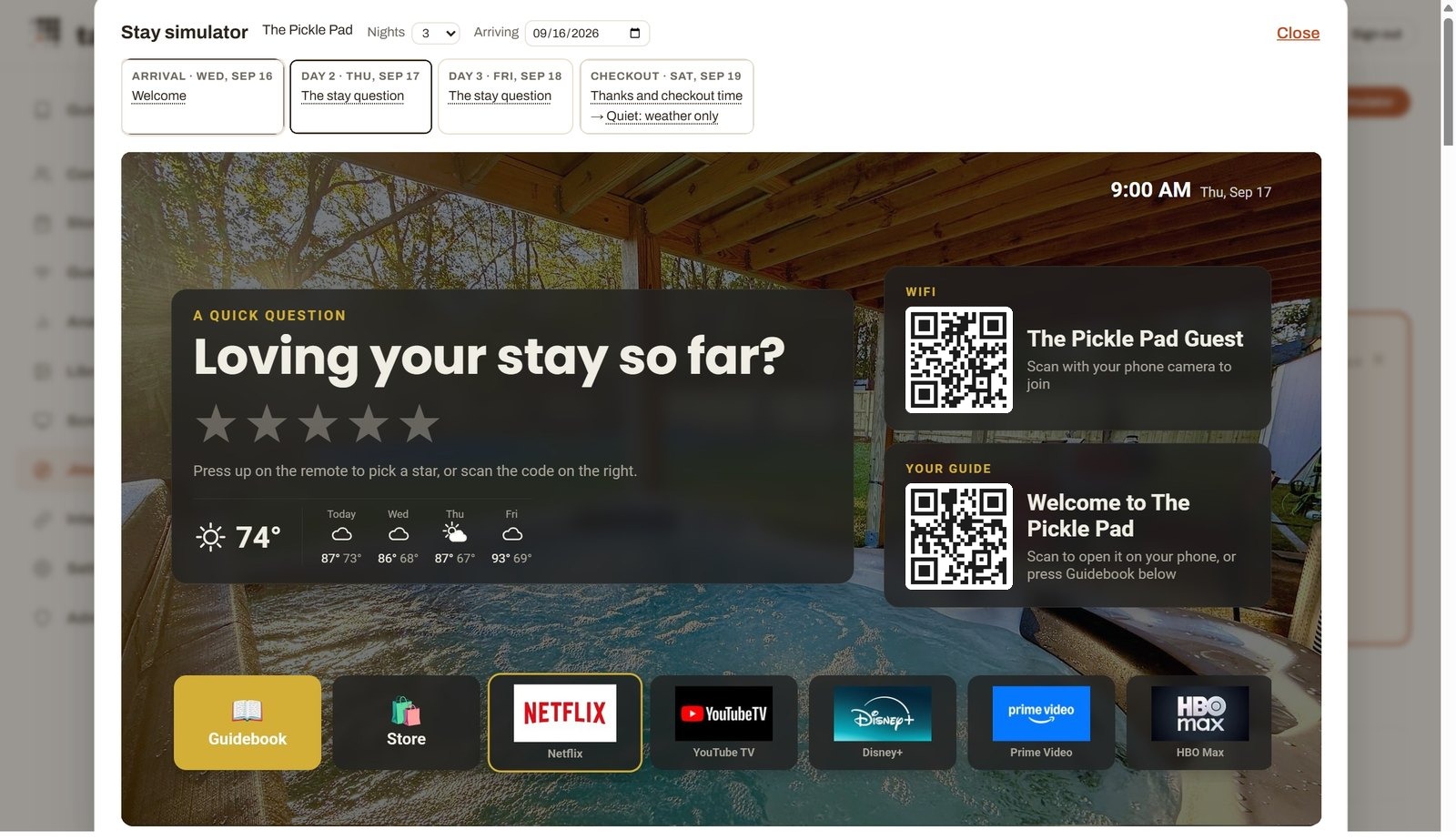
The morning after arrival, five stars on the remote. Good ones go to Google.
Checkout resets it
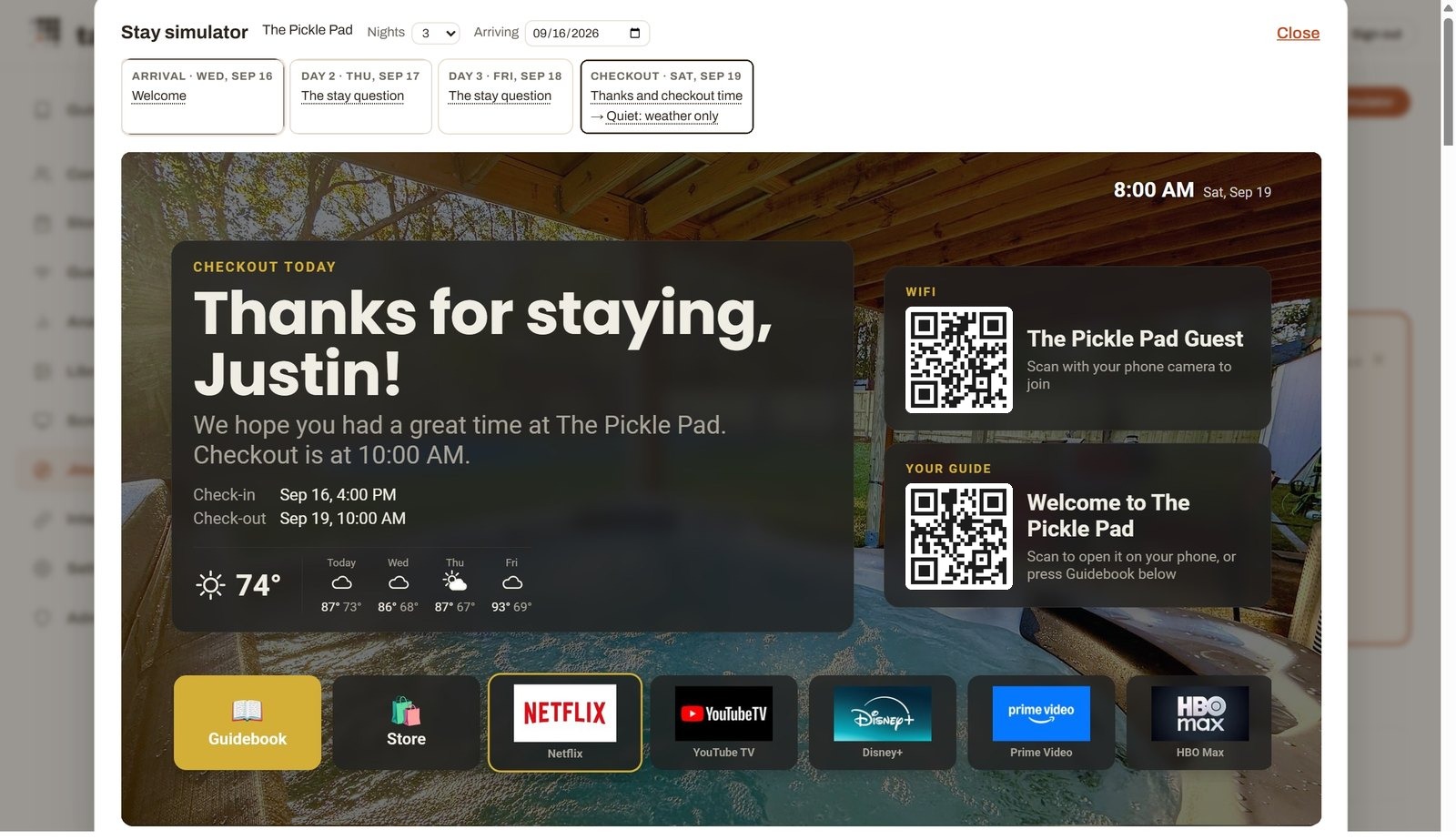
Every app signed out, history cleared, back to the between-stays screen.
The Guest Journey: decide once, every stay follows
This is the part we built the TV around. The Journey is one timeline per property, from the booking to the checkout: the message with their guide link, the TV waking before arrival, the welcome, the stay question, quiet hours, the checkout checklist, the TV turning itself off, the screensaver between stays. Set it once, per TV where it matters, and every reservation plays it back. A simulator on the page shows you any day of any stay before a guest ever sees it.
Guidebooks tell guests what to do. The Journey does it for them, at the right hour, on the screen in front of them.
Rehearse any stay before a guest sees it
The stay simulator on the Journey page plays a made-up booking through the TV's own screen: pick the nights and the arrival date, then step through each day at morning, midday, evening and night. It shows exactly what the television will show, the welcome, the stay question, the checkout checklist, the quiet screen after checkout, so you can fix a step before anyone checks in.
Ratings that go somewhere
The morning after arrival the TV asks how the stay is going. Five stars on the remote. Four or five are pointed at your Google review page. One to three go to you, privately, typed on a phone or spoken into the remote, so a wobbly first night reaches you and not the internet. The question is yours to word, per property.
Earn 4% on tours, with one click
Tick one box on the Journey and the TV's screensaver shows tours and activities near the house from Viator, each with a code to book. Guests book on Viator, and 4% of every booking is paid to you, through the same Stripe account as your Guest Store. Your property photos and store items run in the same slideshow, between stays too.
The guidebook, on the big screen
Press Guidebook on the remote and your whole guide opens on the television: arrival, the house manual, where to eat, things to do, the store. The same guide guests carry on their phone, read from the couch. The WiFi and guide codes stay on the home screen, so a phone is never more than a scan away.
Wiped after every guest
On checkout day the TV signs every app out, removes any account a guest added, clears what they watched, and goes back to the between-stays screen. The next guest starts clean, and the last guest's Netflix is not still logged in for them to find. That is what it means to run the television, not just put a screen on it.
Bring your own box
Runs on any onn or Google streaming box, or any television that runs Google TV, including Hisense and TCL sets. We sell no hardware. Download the Tabellara App on a laptop on the same WiFi, press Set up, and the TV shows a code. Enter it on your dashboard, name the TV, pick its property. About ten minutes, and everything after that is remote.
Priced per property, three TVs included
$6 per property per month, covering up to three televisions, or $54 a year with three months free. A fourth television is $2 a month. The bundle, a guidebook, Guest WiFi and three TVs at one property, is $15 a month, and three separate licenses at one property become a bundle on their own.
Your first property runs free for 30 days, no card required. A TV belongs to a guidebook, so it pairs with a published guide at the same property.
Questions hosts ask
Which TVs and boxes does it work with?
Any onn box, any Google streaming box (the Google TV Streamer, the older Chromecast with Google TV), and any television that runs Google TV or Android TV, including Hisense and TCL sets. Roughly, if Google's home screen is on it, Tabellara can run it. Fire TV, Roku, Samsung and LG televisions are not supported: they run their own systems, not Google's.
Do I have to buy anything?
No. We sell no hardware. If your television already runs Google TV, install straight onto it. If it doesn't, an onn 4K box from Walmart or a Google TV Streamer turns any television with an HDMI port into a Google TV, and Tabellara takes it from there.
Why an app on a laptop instead of the Play Store?
Because of what the app has to be allowed to do. Signing every guest out at checkout, clearing what they watched, locking the settings and keeping the screen on your welcome all need the app to be the device's owner, and Android only grants that during setup, never to a store download. The Tabellara App does that part over your WiFi in about ten minutes; after that everything is remote.
What does a guest see when they walk in?
Your property photo, a welcome by their first name, the dates of their stay, the weather, a QR code for the WiFi and one for your guidebook, and tiles for the streaming apps you allow. Press Guidebook on the remote and your whole guide opens on the screen.
Can guests sign into their own Netflix?
Yes, exactly as on any Google TV: they sign in from the tile. On checkout day Tabellara signs every app out and clears what they watched, so the next guest starts with a clean screen and the last guest's account is gone.
What can a guest change on the TV?
Nothing that matters. The settings, the account list, the app installer and the home button are locked to your welcome screen; the remote's inputs still work for a game console or a cable box through an Inputs tile. You can open the settings any time from your dashboard with a host code that expires after fifteen minutes.
Does it need a Google account on the TV?
Only if you want the Play Store on it, to install apps like Netflix or Spotify. We recommend a spare Google account made for the house rather than your personal one; it stays on the box, and guests sign into their own services on top of it.
What happens to the TV if I cancel?
Your televisions keep running through the period you paid for. After a 30-day grace period with reminders, each TV returns to its normal Google TV home screen on its own, with its Google account and apps intact. Nothing is bricked and nothing needs a visit; bringing one back later is the Tabellara App again. The Terms describe this in full.
How do ratings work?
The morning after arrival, the TV asks how the stay is going, with five stars on the remote. Four or five stars are pointed at your Google review link. One to three go to you privately, typed on a phone or spoken into the remote, so the problem reaches you and not the internet.
What is the screensaver that sells?
After a few idle minutes the TV cycles through your property photos, items from your Guest Store with a code to order, and tours nearby from Viator with a code to book. Viator bookings pay you a share of the commission. You choose what appears, per property, on the Journey.
Does it work if the internet drops?
Yes. The TV keeps a copy of your guide and of the upcoming reservations, so the welcome, the codes and the guidebook stay on screen through an outage, and it catches up when the connection returns.
What does it cost?
$6 per property per month, covering up to three televisions at that property, or $54 a year with three months free. A fourth television is $2 a month. The bundle, a guidebook, Guest WiFi and three TVs at one property, is $15 a month. Your first property is free for 30 days.
The setup walkthrough, the house Google account and the Hisense notes live in the Tabellara TV help article.
The biggest screen in the house, working for you.
Put your guidebook on the TV your guests already watch. Your first property is free for 30 days.
Start free