HELP CENTER · BILLING
Licenses, billing and canceling
Building and previewing guides is free forever; a license is what lets a guide be published. Licenses are inventory you own: one published guide uses one license, unpublishing frees it for another property without touching your bill, and every license is a flat $6 a month. Guest WiFi and Guest TV have their own licenses at the same price, and all three at one property become the $15 bundle.
The model in one breath
- One license publishes one guide; WiFi and TV have their own
- First guide free for 30 days; keep it live after with one click
- Add licenses any time (prorated, shown before you pay)
- Reduce at your renewal date
- Monthly or annual, switch whenever the math favors it
- Cancel in-app; guides unpublish at period end
The free trial, and keeping your guide live after it
Publishing your first guide starts a free 30-day trial with no card. About two weeks in, and again the day before it ends, we email you.
- Open Settings › Subscription & licenses.
- Click Keep it live after the trial. You enter a card now, and the license starts on the day your trial ends. Nothing is charged before then.
- Settings then shows License scheduled with the date. Change your mind before that day from Manage billing.
If nothing is set up when the trial ends, the guide moves back to draft on its own and its link pauses. Nothing is deleted, and subscribing brings it back with the same link and QR code.
Subscribing
- From Settings, or the first time you publish beyond the trial, choose how many guidebook licenses you need.
- Choose Monthly ($6 a month per license) or Annual ($54 a year, three months free).
- Check out with a card. Every feature is included; licenses only count published guides.
Guest WiFi and Guest TV licenses
- A Guest WiFi license covers one network at $6 a month or $54 a year.
- A Guest TV license covers one property with up to three televisions at $6 a month or $54 a year. Each additional TV is $2 a month.
- Both need a published guidebook at the same property. Your first network and your first TV property each get their own 30-day trial.
- A property with all three on separate licenses becomes the $15 bundle by itself, and adding the third product to a property with the other two lands as the bundle for the difference. Leaving the bundle is your click, on the property's row in Settings.
Adding licenses
- In Settings, click Adjust licenses on the product.
- Pick the new count. The exact prorated charge for the rest of your current period shows before you confirm.
- Confirm. The charge is made immediately and the new licenses are usable at once.
If the card declines, nothing changes and you get an email explaining why.
Reducing licenses
Reductions take effect at your next renewal date, so you keep what you paid for; there are no partial-period credits. You cannot reduce below the number of guides currently published; unpublish first.
An unused license keeps billing until you reduce it. Deleting a property frees its license too.
Monthly to annual
- In Settings, click Switch to yearly. The difference is charged immediately and your annual date starts now.
- Switch to monthly takes effect at the end of your annual term.
Settings shows the real amounts for your license count before you confirm.
Canceling
- In Settings, click Cancel subscription.
- Your subscription runs to the end of the period you already paid for. At that point your published guides unpublish, WiFi sign-in pages are removed (the networks stay as they were) and TVs return to their normal Google TV home screen.
Nothing is deleted: guides, photos and properties stay in your account. Resume before the period ends, or subscribe again later, and the same links come back.
Manage billing
Manage billing opens Stripe's secure portal for payment details only: update your card and view or download invoices. Everything about the subscription itself, license counts, plan switching, cancel and resume, lives in Tabellara Settings.
Common questions
Do I need a card to try Tabellara?
No. Sign up, build and preview with no card and no time limit. Publishing your first guide starts a free 30-day trial, still with no card; a card is only requested when you keep guides live after that.
What if my renewal payment fails?
You get an email right away and Stripe retries the card over the following days. Update the card in Manage billing to clear it. If every retry fails, a 30-day grace period runs before anything is unpublished.
Can I get a receipt for my accountant?
Yes, every invoice is in Manage billing as a PDF, and the confirmation email for each charge includes a link to it.
Go further
A guidebook is the start of the stay. These run on it, at the same properties, from the same dashboard.
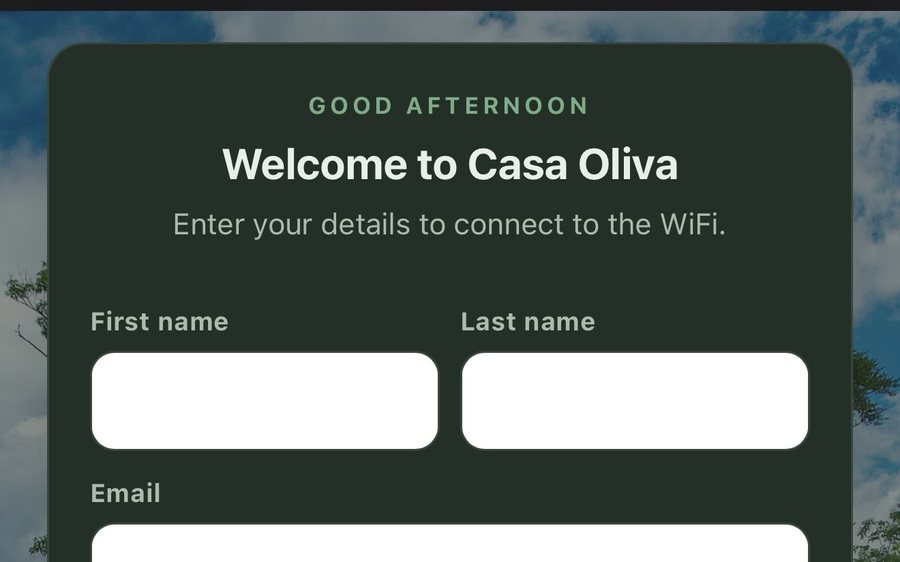
Guest WiFi
Guests join your network through a branded sign-in page and land in the guidebook. Every name and email is yours to keep. Runs on the UniFi gear you already own: $6 a network, the first free for 30 days.
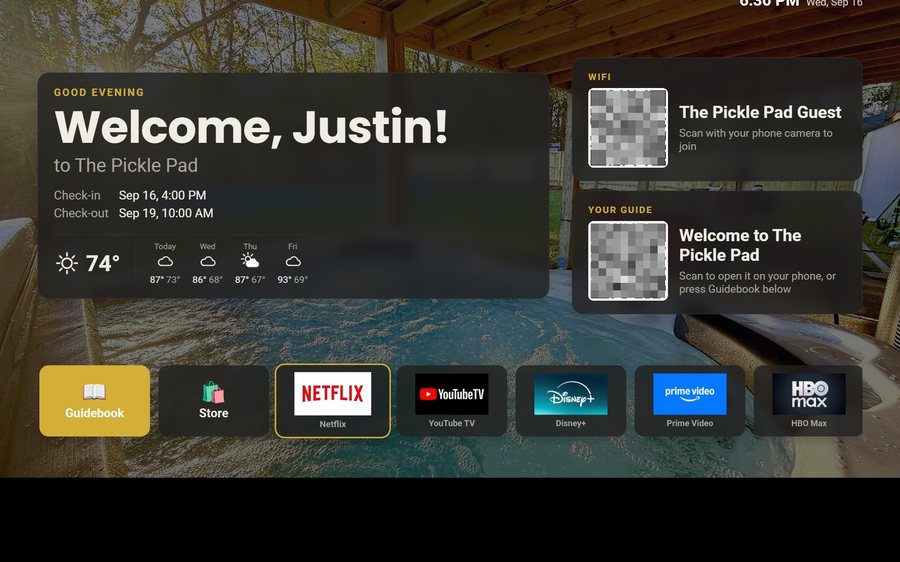
Guest TV
Your guidebook on the onn or Google TV in the living room: a welcome by name, the WiFi and guide codes on screen, and every app signed out at checkout. $6 a property for up to three TVs, the first free for 30 days.
Still stuck?
Email support@tabellara.com and a human will help; we usually reply the same day.
All help articles